

Locking and unlocking the door is one of those tasks most people take for granted — until it becomes difficult. Small keys, stiff locks, or juggling groceries can make a simple moment frustrating or even unsafe. Discover the best smart door locks for seniors that enhance safety, promote independence, and offer peace of mind for families and caregivers alike.
For older adults, smart door locks for seniors offer a stress-free solution. They remove the need for keys entirely, let you open doors with your phone or voice, and even allow trusted family or caregivers to access your home securely.
It’s convenience, safety, and independence — all built into a single smart device.
A door that unlocks for you isn’t luxury — it’s freedom and security, wrapped in simplicity.
What Are Smart Door Locks?
Smart door locks for seniors are electronic locks that replace or work with your existing deadbolt, letting you unlock doors without using a key. They can be controlled through keypads, mobile apps, Bluetooth, fingerprint readers, or even voice commands via assistants like Alexa or Google Home.
Most models are battery-powered and easy to install without major changes to your door. You can unlock the door by entering a simple code, tapping your phone, or saying, “Alexa, unlock the front door.”
For seniors, these devices eliminate struggles with keys, provide easy entry during emergencies, and send alerts when doors are locked or opened — giving everyone peace of mind.
Why They Matter for Seniors
Easier Entry for Limited Dexterity
Arthritis or reduced grip strength can make turning keys painful. Smart locks eliminate the need to twist, grip, or fumble. A keypad or fingerprint unlock means getting in comfortably — rain or shine, day or night.
Caregiver and Family Access
You can assign temporary or permanent access codes to trusted people — children, caregivers, or nurses. They can enter without needing a physical key, and you can revoke access anytime right from your phone.
Safety and Peace of Mind
Forget to lock the door? The lock can do it automatically after a few minutes. Some models even send reminders if the door is left unlocked, reducing anxiety and improving daily security for those living alone.
Support for Memory Challenges
For seniors managing memory loss, forgetting whether a door is locked can be stressful. Smart locks automatically confirm status through visual indicators or voice responses. No more second-guessing or worrying late at night.
Emergency Assistance
In emergencies, authorized caregivers or family can unlock the door remotely, ensuring help arrives quickly without breaking in or waiting for a spare key.
Smart locks for seniors don’t replace independence — they protect it.
Features to Look For
Simple Keypad with Large Numbers
Choose a keypad with backlit, easy-to-read numbers. This ensures visibility at night and accessibility for those with limited vision or hand strength.
Voice Assistant Compatibility
Make sure your smart lock works with systems like Alexa, Google Assistant, or Siri. This allows full voice control — perfect for seniors who already use voice commands for thermostats or lights.
Auto-Lock and Unlock Timers
Auto-lock ensures the door secures itself after a set time, and auto-unlock (using your phone’s Bluetooth proximity) opens it automatically as you approach — no buttons, no stress.
Battery Backup and Manual Override
Most smart locks use standard batteries that last 6–12 months. Look for one that provides alerts before power runs low and includes a manual key backup for peace of mind.
Activity Notifications and Alerts
Many locks send notifications when someone enters or exits. Family members can monitor activity discreetly — helpful for caregivers ensuring safety without intruding.
Shared Access Codes
If you regularly have visitors or medical aides, create individual codes. This gives you full control over who enters your home and when, without tracking down spare keys.
Recommended Smart Door Locks for Seniors
These models combine reliability, accessibility, and smart features suited for older adults.
Each of these locks is senior-friendly:
SwitchBot Lock Pro
The SwitchBot Lock Pro is a popular choice for older adults who want the convenience of a smart lock without replacing their existing deadbolt. It installs over most standard locks, which means no drilling, wiring, or permanent changes to the door.
The lock can be controlled through a simple smartphone app or by voice when paired with a compatible smart assistant, making it easier to lock and unlock the door without handling keys. Many retirees appreciate that it preserves their current lock while adding modern convenience, offering a practical upgrade that feels familiar rather than intimidating.
SwitchBot remains the top pick for simplicity and compatibility, matching your other smart devices like automated blinds and thermostats.

- 【Wide Compatibility, Check Before Purchase】 Lock Pro is designed for most North American single-cylinder deadbolts and…
- 【Retrofit Install, Keep Your Original Key】 Upgrade your existing deadbolt to a smart lock without replacing the lock…
- 【Stable Mounting & Guided Setup】 Lock Pro comes with mounting accessories and app-guided setup to help you complete…
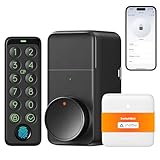
- Supports Up to 15 Unlocking Methods (Keypad Touch Included): Keypad Touch is included to deliver industry-leading fingerprint…
- Upgraded Compatibility + No-Drill Retrofit Install: Aluminum alloy casing for a sturdier, durable build. Retrofits to your…
- Unlock Using Your Voice, Supports Matter (Hub Mini Included): This Lock Pro kit includes Hub Mini Matter Enabled and supports…
Schlage Encode
The Schlage Encode is often chosen by older adults who value reliability from a well-known, long-established lock manufacturer. It offers built-in Wi-Fi, allowing the lock to connect directly to a home network without needing an extra hub. With Alexa and Google integration, users can check lock status or lock the door using simple voice commands.
Its keypad is clearly labeled and easy to read, which many retirees find reassuring. Schlage’s long reputation for durability also adds peace of mind for those who want a smart lock that feels sturdy, familiar, and dependable rather than overly complex.
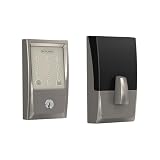
- ANYWHERE ACCESS: With built-in WiFi compatibility, you can easily and securely connect your Schlage Encode Deadbolt to your…
- PEACE OF MIND: Lock and unlock from anywhere, manage up to 100 access codes for keyless entry, view lock history, receive…
- VOICE CONTROL: Works with Alexa and Google Home for optional, hands-free convenience when paired with the Schlage Home app…


- ANYWHERE ACCESS: With built-in WiFi compatibility, you can easily and securely connect your Schlage Encode Deadbolt to your…
- PEACE OF MIND: Lock and unlock from anywhere, manage up to 100 access codes for keyless entry, view lock history, receive…
- VOICE CONTROL: Works with Alexa and Google Home for optional, hands-free convenience when paired with the Schlage Home app…
August Wi-Fi Smart Lock
This Angust Wi-Fi Smart Lock is a good option for older adults who want a smart lock that installs quickly without changing the look of their door. It fits over most existing deadbolts and can usually be installed in just a few minutes using basic tools. Because the Wi-Fi is built in, there’s no need for an additional hub.
The lock can be controlled through a simple app, allowing users to lock or unlock the door remotely, check status, or grant access to trusted family members. Many retirees appreciate that the exterior of the door stays the same, which helps the upgrade feel subtle and familiar.
No products found.
No products found.
Level Bolt Smart Lock
Each Level Bot Smart Lock is designed for those who prefer modern convenience without visible technology. Unlike traditional smart locks, it installs inside the door and is completely hidden from view, preserving the classic appearance of existing hardware. This makes it appealing to older adults who want smart features without keypads or noticeable changes.
The lock works quietly through a smartphone app and maintains a traditional key as backup. Many retirees find Level Bolt reassuring because it adds security and convenience while keeping the door looking exactly the same as before.

- There is a newer version of this product available. Search ASIN B0F8RC3YRF for the latest model.
No products found.
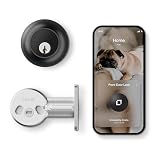
- IMPOSSIBLY SMALL: By hiding technology on the inside of the door, Level Lock is the smallest smart lock ever made.
- BLUETOOTH + MATTER BUILT-IN: Interoperable with Apple Home, Google Home, Amazon Alexa, and SmartThings for easy integration…
- LOCK & UNLOCK FROM ANYWHERE: Remotely lock or unlock your door and get activity notifications from anywhere, anytime using…
Tips for Everyday Use
Use Short, Easy Access Codes
Choose codes that are easy to remember but not predictable. Many seniors prefer using birthdays or simple number pairs (like 1122).
Enable Entry Notifications
Turn on push alerts to get a gentle ping when someone enters or leaves. This is great for caregivers who check on loved ones throughout the day.
Assign Guest Codes for Temporary Visitors
If a nurse or repair worker needs entry, give them a time-limited code that expires automatically after use. No risk of lost keys or forgotten returns.
Check Battery Levels Monthly
Most locks give low-battery warnings weeks in advance. Replace batteries promptly to avoid lockouts. Keep spares nearby just in case.
Use Voice Commands When Hands Are Full
If you have a compatible assistant, say “Alexa, lock the front door” as you head to bed. You can also ask, “Is my door locked?” for instant peace of mind.
Common Questions
Are smart door locks safe?
Yes. Most use encrypted connections that are more secure than standard key locks. Some models even record each entry and exit for added security.
Do they work without Wi-Fi?
Yes. Many models use Bluetooth and still function offline. Wi-Fi adds convenience for remote control, but the lock itself will continue to work normally.
What happens if I forget my phone or code?
Nearly all smart locks include backup key access or temporary voice-unlock features. You can also have a trusted person open it remotely through the app.
Can my caregiver unlock the door for me?
Absolutely. Caregivers can receive their own codes or use app access to unlock the door when they arrive. You can remove their access anytime.
Is installation difficult?
Most modern smart locks fit over your existing deadbolt and can be installed in under 20 minutes with a screwdriver. No wiring or drilling required.
Final Thoughts
For seniors, smart door locks offer freedom without compromise. They remove the hassle of keys, add safety through automation, and bring control back to your hands — or your voice.
Whether you’re aging in place, living with mobility limitations, or caring for someone who is, this small device makes a major difference in peace of mind and everyday comfort.
Technology doesn’t replace independence — it reinforces it. With a smart lock, safety becomes effortless, and home feels even more like home.
Where to next?
If you’re exploring ways to make everyday living more comfortable and enjoyable, you may find it helpful to browse our Smart Home & Easy Tech Hub, where we share simple guidance on practical tools designed for adults over 60.
For readers interested in comfort-focused upgrades, our guide to Premium Home Upgrades for Older Adults highlights thoughtful improvements that support ease and relaxation at home. And if clear sound matters to you or your household, our article on Wireless TV Headphones for Seniors explains options that make watching television more enjoyable without disturbing others.
Looking for companionship later in life? eharmony offers a dating platform many seniors use to meet people who want something more meaningful.
Meet Compatible Singles →


